The civil engineering vicious cycle – and how to break it
31.07.2025
Skills shortage in civil engineering? Less staff, more output - this is how it works
01.09.2025

Modern construction site - but documentary like 20 years ago?
Many civil engineers are familiar with this:
Measurements are taken with the measuring wheel, sketched on a clipboard or piece of paper.
Photos end up somewhere in the office via WhatsApp - if at all.
And later in the office?
There are no measurements, context or pictures. Nobody knows anymore what happened where.
Then the guesswork begins: Adding measurements, sorting photos, digitizing sketches.
The actual work has long since been done - but the measuring still takes hours.
Reworking: The underestimated time waster in civil engineering

What happens on the construction site is often done twice - once outside, then again in the office.
This not only costs time, but also nerves and margins.
Typical procedure:
- Measure quickly on site with the measuring wheel
- Measurement by hand on paper or clipboard
- Take photos separately, without assignment
- Rework everything in the office, determine quantities, transfer and create inserts manually
The follow-up work often takes longer than the actual measurement.
The new way: measurement report in 3 clicks
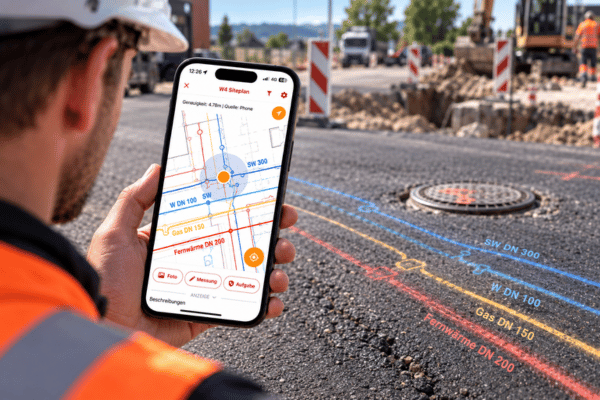
With SitePlan, measurements can be taken digitally directly on the construction site:
Measuring via app + GNSS antenna - accurate to the centimeter, traceable, complete.
All data (points, photos, notes, time & location) is automatically recorded and transferred to the office in real time. And as soon as the project is opened in the web portal, all it takes is three clicks:
- Select report type
- Select area
- Export
The measurement report is ready - in seconds.
What is included in the measurement report:


- Section of plan with measurement
The first page shows the recorded measurement data on a satellite image or plan background - including project information such as date, company, scale and plan source
- Color-coded layer structure for clear assignment
All measured areas, lines and points appear in different colors according to layers (e.g. asphalt, base course, pipes)
- Clear summary table
Automatically calculated area, length and perimeter values - organized by category and layer
- Detailed coordinate lists (right-hand value, vertical value, height)
All points, lines and areas are documented in tabular form - fully traceable
- Verifiability by client & construction supervision
Thanks to the complete coordinate documentation, all quantities can be checked mathematically and locally
Why it pays off:
If you don't rework, you gain time - and reduce errors.
SitePlan creates measurable relief in everyday life:
✔ No more guesswork in the office
✔ Do not enter data twice
✔ No discussions with the AG
✔ More billable service - with less effort
Now out of the paper chase
Would you like to know how exactly you can use SitePlan Measurement reports in just 3 clicks and save yourself rework and trouble?
Then let us advise you personally and without obligation: